
Update: Web-push notifications are now enabled for the Chrome browser. This article has been updated with new information.

How many subscription channels are you offering on your blog?
If you haven’t already enabled the must-have subscription options, you should do that now.
With recent advancements in technology, there are now a few new methods that you can use to notify your readers of the latest posts or important updates from your blog.

Today, I will be talking about PushEngage: A web push notification service for WordPress. It also supports other platforms like e-commerce sites, WooCommerce, Joomla, Drupal, bbPress & much more.
Before moving ahead, let me show you how much traffic I got in 3 days from PushEngage:

Using the PushEngage service, you give another subscription option to the readers of your blog who are using Chrome (all platforms) or Safari on Mac OS.
Read: Benefits Of Web Push Notifications For Bloggers – Powerful Marketing Tech
If you are using a smartphone (iOS or Android), I’m sure you are aware of push notifications sent by your installed apps. Web-push notifications are similar to smartphone push notifications where your subscribers will be notified when a new post is published or when you manually send a push notification.
PushEngage is an awesome service that allows you to send these push notifications.
In this tutorial, I will show you how easy it is to enable push notifications for your WordPress blog.
You should open your WordPress blog’s admin panel and follow along with this tutorial. Within 5 minutes, your WordPress blog will be web-push notification enabled.
How to Get more subscribers & traffic with browser Push Notifications
At this moment, this service supports the Chrome browser on all platforms (mobile & desktop) and the Safari browser on Mac OS. In the future, we can expect it to support other browsers like Firefox.
The setup part is quick and easy. So let’s get started with this step-by-step guide.
First, go ahead and create an account on PushEngage over here.
The free account allows you to send 30 campaigns per month for 2,500 subscribers, which is a decent number for a small and medium-sized website.

Once you have signed up for an account, you need to add your blog’s name and add your blog’s logo. This is useful for the branding of your push notifications.

- Go to Plugins > Add New and search for “PushEngage”. Install and activate the plugin. <Link of the plugin>
- Upon activation of the plugin, click on PushEngage > Dashboard. To activate the plugin you need to get the API Key from your PushEngage account. I have marked the points in the below image that will help you create the API Key.
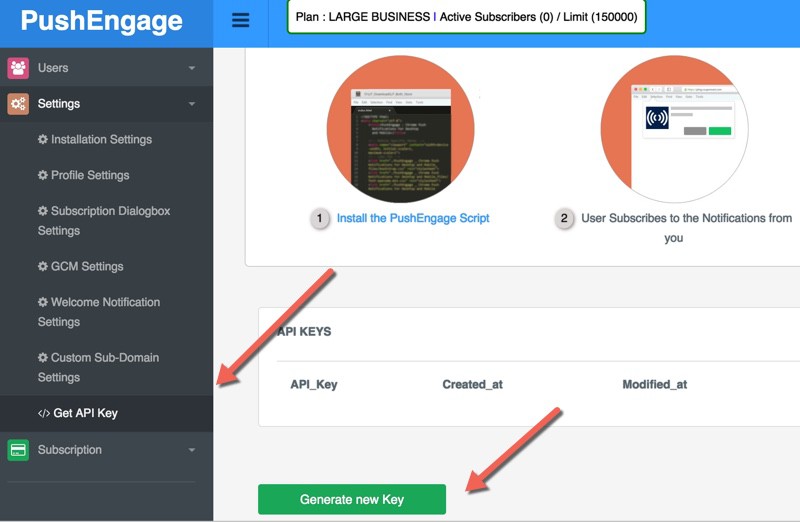
Once you are done activating the plugin, now you need to configure the subscription settings.
- Go to Settings > Installation Settings & add your logo. (This is important for your brand identity.)

Subscription Dialog Box Settings
This is where you will configure the prompt that users will see to subscribe to your push updates. I use “Single Step Optin” for ShoutMeLoud & I suggest the same for you. “Safari Style Box” is another popular method.

Once you are done and logged in, you will see a dashboard like the one below (in the screenshot). It will show you the stats of existing subscribed users and other details.
You can click on the “Send A Notification” tab to send a custom push message anytime.
GCM Settings
This value is pretty crucial & you really should create your GCM account.
If you are not so tech-savvy, you can ignore it. However, using this documentation will make the process easier.
Welcome Notification

This step is optional.
If you want to send a welcome message to users who subscribed to your notifications, use this feature.
You can ask users to download your mobile app or send them to your top resources.
Stats
Here is a Stats report of push notifications from ShoutMeLoud:

In your post writing section, you will see an option to send push notifications when you publish or update a post.

Try not to send too many push notifications in a short span. In the next guide, I will share a few tricks of PushEngage to help you make the most out of push notifications.
Do let me know your experience with web-push notifications. Do you know of another modern subscription option that I should cover here on ShoutMeLoud?
November 2023 update:
PushEngage added a new feature called template, which will help you make a campaign live quickly with pre-made template. These templates are designed for higher conversions.
Let me know how you are increasing Push notifications to grow your website traffic and profit?
Here are a few hand-picked articles for you to read next:
- ShortPixel Review: How To Automatically Compress & Optimize WordPress Images
- Decoding 3 Best Solutions For Interlinking Blog Posts In WordPress
- How To Drive Huge Traffic To Your Blog In A Few Weeks




I was seeing you were using LetsReach.. I tried that but that is not good. Today I read this post.. Gonna try this for my blog. Thank You Harsh 🙂
Thanks Harsh for sharing this. I was looking for something like this from months but could set up only after reading this article.
Need to say again thanks for sharing.
Love you shotmeloud
Thanks for the post Harsh ! Actually a good plugin. I thought push notification is part of cording and only coders can do that. But with this post you cleared my misunderstandings.
From the last couple of weeks, I’m noticing that every website is asking for permission for push notification and today just after opening ShoutMeLoud, I got everything I was keen to know about Push Notification.
Thanks Harsh
Hey Jayant,
Happy to help.
Hi Sir,
I’m create a new blog many days I was thinking to add push notifications for own blog. Push notification also important for blog. Thanks for this awesome post.
Hey Sanjay,
Glad I could help.
The Push notification is not showing in Mobile browsers.What i do…???
This one is the best tool to increase audience on our blog. Thanks for sharing this method.
Wow! This is very helpful. I am not using any of that but now I think it might be a good idea to set up something like this. As always, providing great value and doing it in a very simple way! Thanks a lot.
One Signal is the best push notification api I know… And it’s and interesting to use….Demo on techhabor.com
@Owraku
One Signal looks fascinating but it comes with a costly bargain.
It sells user cookies. Especially those who are making money from their blog or running E-commerce portal doesn’t prefer OneSignal.
WOW this is gold ! I am damn sure push notifications is much better than any other subscription tool in terms of instant connection and reaching to the subscribers. Thanks for the awesome tut ! 🙂
Surely Pushengage is modern function for blog. Sending Notification of my blog like an app’s notification , How it is pleasant. I will try it.
Good tutorial, pushengage is a great plugin!
Is Pushengage plugin available for website with wordpress blog.
@Albin
Yes, you can integrate it with WordPress plugin or the script they provide. You can use Pushengage on any platform.
I would like to see something like this multi-platform. Eespecially for mobile phones as we’re experiencing more and more mobile users on our site. This seems to be a global trend I think.
@Csaba
1) Google Chrome is push enabled, so this technology is now available on android platform via chrome browser.
2) You can also have a mobile app and have it push enabled. I use it for ShoutMeLoud Android app, using a service call Parse.com
I consider mobile app for the blog as double-optin, as an end user have to install it.
This (Web-pus notification) is effective but a good idea is to show subscription notification after 4-5 visits. (These way we will get more targeted subscribers). What do you think?
Harsh, Thanks for the Nice Info
But How to use in the Blogspot Blogs? I need Help..
there is a option available for blogger also.
Can I use it on blogger/ blogspot?
@Vipin
Yes you can!
Thats an amazing plugin Harsh. Thanks for introducing me to this. I am sure this will help my Ipad users as most of them would be using Safari to access my blog.
Are these notifications for mobile users also ? Like pankaj sir said. Overall it is a nice plugin but can I use it on a multi-niche blog ?
@Rachit
You can use it on any type of blog. This notification is available for all major browsers.
Hi Harsh, First of thank you very much for sharing this beautiful technique and this is numerouno as well, since this is a notification the users will get on the page right there in the screen while they are in the page. This is really very nice. At this modern age we should find new ideas and new techniques which would be very convenient and easy for users to get to the reason they are reading the post. However, I have couple of questions.
* Does this apply for the mobile browsers as well?
* When will the push notifications appear? If an end user is reading a post and then you publish another post at that time or whenever a new post is published even if the user is checking your website at a later point of time?
Thank you again. 🙂 Cheers!
@Prabhudatta
Yes, it would also shown on mobile browser.
You decide when to send push. You can send it as soon as article goes live or send it manually later.
Nice tutorial to setup auto push notification. WHy only for Tech niche it also works like charm for entertainment niche like Movie info or review.my opinion.
@Deepak
You are right as it works for any niche. The reason I mentioned tech niche here as most of the tech oriented users are using Mac OS.